
Online shoppers do not always know the exact product they want.
Instead of searching for a product name, they might ask:
“I need a waterproof backpack for travel under $100.”
Or:
“Which laptop is best for programming and has at least 16GB RAM?”
Traditional WooCommerce search and filters can struggle with these conversational requests. An AI shopping assistant for WooCommerce can make product discovery much more natural by understanding what shoppers are asking, matching their intent with your catalog, answering product questions, comparing options, and helping customers move from discovery to checkout.
In this guide, you’ll learn how to add an AI shopping assistant to WooCommerce, what features to look for, how the integration works, and how to build an AI-powered shopping experience without replacing your existing WooCommerce store.
What Is an AI Shopping Assistant for WooCommerce?
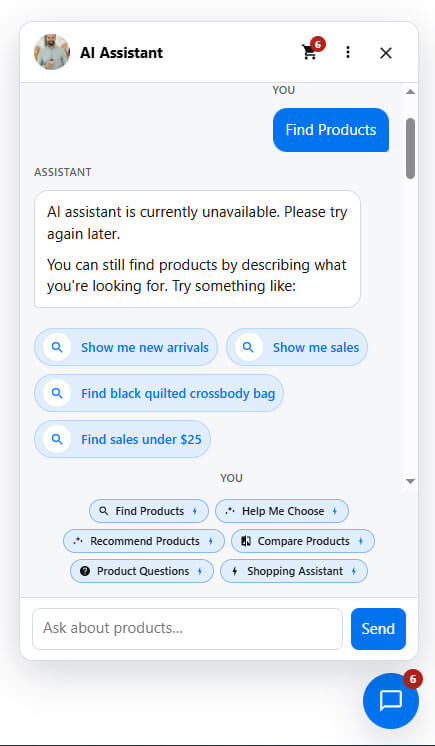
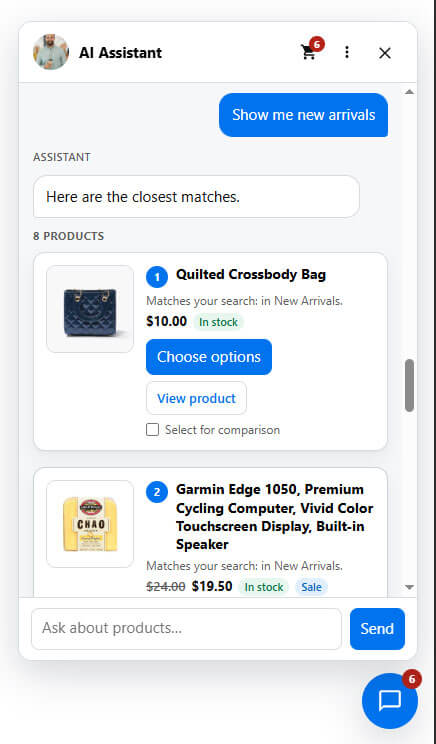
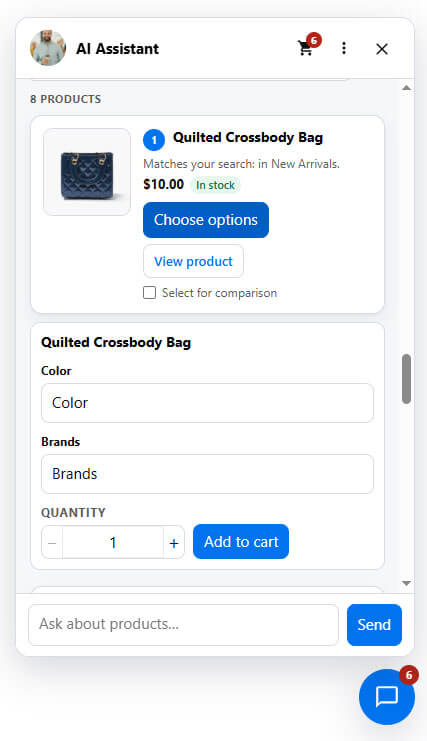
An AI shopping assistant is an intelligent conversational layer added to a WooCommerce store that helps customers find and purchase products through natural-language conversations.
Unlike a traditional chatbot that mainly answers predefined questions, an AI shopping assistant can connect conversations with your actual WooCommerce catalog.
For example, a customer could say:
“Show me running shoes for beginners under $120.”
The assistant can interpret the product type, use case, and budget, then find relevant products from the store.
A more advanced assistant can continue the conversation:
“Do you prefer a lightweight shoe or something with more cushioning?”
The customer can answer naturally, and the assistant can refine the recommendations.
This makes the experience closer to talking with a knowledgeable sales assistant than using a conventional search box.
Why Add an AI Shopping Assistant to WooCommerce?
WooCommerce already provides powerful ecommerce functionality, but customers still have to navigate product categories, filters, product pages, and search results.
An AI shopping assistant can make that journey more conversational.
1. Improve Product Discovery
Customers can describe what they need instead of knowing the exact product name.
For example:
- “Find a black jacket under $150.”
- “I need a laptop for video editing.”
- “Show me running shoes for flat feet.”
- “What should I buy for a camping trip?”
- “Do you have this shirt in medium?”
The assistant can translate these requests into product searches and recommendations.
WooCommerce itself supports product recommendation strategies across shop, product, cart, checkout, and other locations, showing how important contextual product discovery can be throughout the shopping journey.
2. Answer Product Questions Instantly
Customers often have questions before buying:
- What sizes are available?
- Is this product in stock?
- What colors are available?
- What are the product dimensions?
- Is this compatible with another product?
- What’s the difference between these two products?
Instead of forcing customers to search through product descriptions or contact support, an AI assistant can provide conversational answers using available product information.
The important part is catalog grounding.
Your WooCommerce catalog should remain the source of truth for product names, prices, variations, stock, attributes, and specifications.
3. Provide Personalized Recommendations
AI can help customers narrow down their options based on their requirements.
For example:
“I need a coffee machine for a small office. My budget is $300.”
The assistant can consider factors such as:
- Product category
- Price range
- Attributes
- Availability
- Customer requirements
- Related products
- Upsell and cross-sell opportunities
This is more useful than simply displaying a generic “You may also like” section.
4. Guide Customers Toward Checkout
An AI shopping assistant should not stop at product discovery.
A complete shopping experience can continue from:
Search → Recommendation → Comparison → Cart → Checkout
For example:
Customer: “Which one would you recommend?”
AI: “Based on your budget and requirements, Product A is the closest match.”
Customer: “Add it to my cart.”
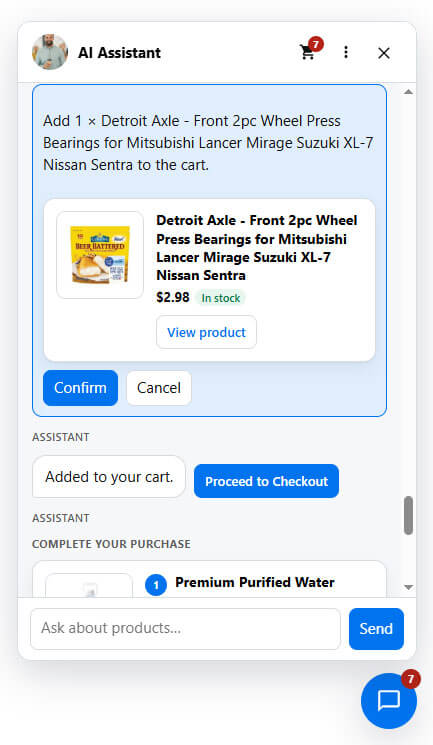
AI: “Product A has been added to your cart.”
Keeping these actions inside the conversation can reduce friction between product discovery and purchase.
How to Add an AI Shopping Assistant to WooCommerce
There are several ways to add AI functionality to a WooCommerce store, but using a purpose-built WooCommerce AI plugin is usually the simplest approach for store owners who want an integrated shopping experience.
Here is the typical process.
Step 1: Choose an AI Shopping Assistant Plugin
First, choose an AI shopping assistant that is designed specifically for WooCommerce.
Do not choose a plugin based only on whether it has a chat window.
A useful WooCommerce AI assistant should understand ecommerce data and ideally support features such as:
- AI product search
- Natural-language product discovery
- Product recommendations
- Product Q&A
- Product comparison
- Product variations
- Cart assistance
- Upselling and cross-selling
- Order assistance
- Multilingual conversations
- Analytics
- AI provider configuration
WooAssistant, for example, is designed as an AI shopping and sales layer for WooCommerce rather than simply a general-purpose chatbot. It connects the conversational experience with WooCommerce products, categories, attributes, variations, pricing, stock, and related products.
Step 2: Install the Plugin
Once you’ve selected your AI shopping assistant, install it on your WordPress website.
From the WordPress dashboard:
Plugins → Add New → Upload Plugin
Upload the plugin ZIP file, install it, and activate it.
The exact installation process can vary between plugins, but WooCommerce extensions generally follow the standard WordPress plugin installation workflow.
Step 3: Connect Your AI Provider
Most modern AI shopping assistants require an AI provider to process natural-language conversations.
Depending on the plugin, this could include providers such as:
- OpenAI
- Google Gemini
- Other supported AI providers
For example, WooAssistant supports OpenAI and Google Gemini and allows store owners to select supported models and configure usage controls.
After connecting your provider, test the connection before making the assistant available to customers.
Why AI Provider Choice Matters
AI usage can generate API costs, especially on stores with high traffic.
A good WooCommerce AI plugin should therefore provide controls such as:
- Model selection
- Token or usage limits
- API connection testing
- Usage tracking
- Fallback behavior
This gives store owners more control over AI usage and operating costs.
Step 4: Connect the Assistant to Your WooCommerce Catalog
This is one of the most important steps.
Your AI assistant should understand your actual WooCommerce catalog rather than relying only on generic AI knowledge.
The assistant may use information such as:
- Product titles
- Product descriptions
- Categories
- Tags
- Attributes
- Variations
- Prices
- Sale prices
- Stock status
- Product relationships
This allows the AI to answer questions using current store information.
For example, instead of generating a generic answer to:
“Do you have blue running shoes under $100?”
the assistant can search your actual catalog and return matching products.
WooAssistant is designed around this catalog-grounded approach, with WooCommerce remaining the source of truth while AI handles the conversational layer.
Step 5: Enable AI Product Search
Traditional WooCommerce search generally works best when shoppers know what they are looking for.
AI search changes the interaction.
Instead of:
Search:waterproof backpack
a shopper can write:
“I need a waterproof backpack for a three-day hiking trip under $100.”
The AI can interpret multiple requirements from the same request.
A sophisticated WooCommerce AI search system can combine:
- Natural-language understanding
- Categories
- Attributes
- Price
- Stock availability
- Product relevance
- Semantic matching
- Traditional WooCommerce search
This hybrid approach can be especially useful because AI should enhance ecommerce search rather than become the only search mechanism.
Step 6: Enable Product Recommendations
After helping customers find products, the assistant should be able to recommend relevant alternatives and complementary products.
For example:
“I recommend this camera based on your budget. You may also need a compatible memory card and camera bag.”
This creates opportunities for:
- Upselling
- Cross-selling
- Related products
- Alternative products
- Cart-aware recommendations
WooCommerce already supports contextual recommendation strategies across product, cart, checkout, and other locations. AI can add another layer by making recommendations conversational and based on customer intent.
Step 7: Add Product Comparison
Customers often have difficulty choosing between similar products.
For example:
“What’s the difference between these two laptops?”
Instead of opening multiple product pages, the customer can ask the AI assistant.
A useful product comparison should focus on relevant attributes such as:
| Feature | Product A | Product B |
|---|---|---|
| Price | $899 | $999 |
| RAM | 16GB | 32GB |
| Storage | 512GB | 1TB |
| Display | 14″ | 15.6″ |
| Best For | Everyday use | Professional work |
The AI can then explain which option better matches the customer’s stated requirements without forcing them to manually compare every specification.
Step 8: Enable Cart Assistance
The shopping conversation can become even more useful when customers can manage their cart without leaving the assistant.
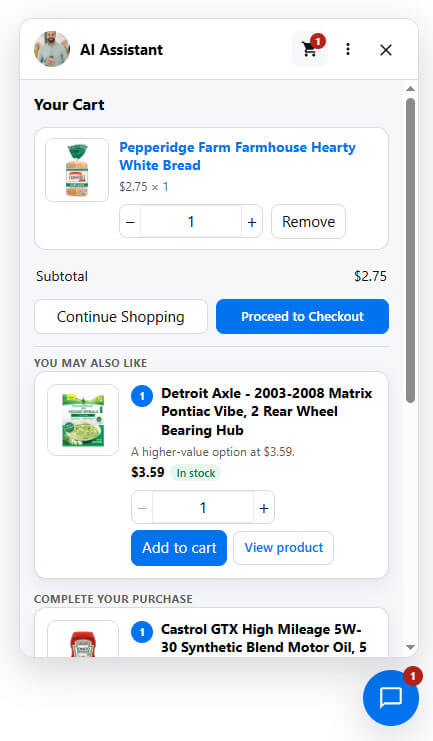
Depending on the plugin, customers may be able to:
- View cart items
- Add products
- Change quantities
- Remove products
- Clear the cart
- Continue to checkout
For safety and clarity, cart-changing actions should use confirmation before modifying the customer’s cart.
WooAssistant, for example, supports cart actions with confirmation before changes and provides a checkout shortcut from the conversation.
Step 9: Add Order Assistance
The customer journey doesn’t necessarily end after checkout.
Customers frequently ask:
- Where is my order?
- What did I purchase?
- Has my order shipped?
- What’s my order status?
- Can I see my recent order?
An AI order assistant can handle routine questions while keeping sensitive information protected.
For guest customers, verification can be required before displaying order information.
This creates a more complete customer-service experience without turning the AI assistant into a generic support chatbot.
Step 10: Customize the AI Assistant
Your AI shopping assistant should look like part of your store.
Depending on the plugin, you may be able to customize:
- Assistant name
- Greeting
- Avatar
- Brand colors
- Chat bubbles
- Launcher position
- Quick Actions
- Fallback messages
- Language
- Floating or shortcode placement
For example, instead of a generic greeting:
“How can I help?”
you could use:
“Hi! 👋 Looking for something specific? Tell me what you need and I’ll help you find the right product.”
The goal is to make the assistant feel like a natural part of the shopping experience.
Step 11: Add Multilingual Support
If your store serves international customers, multilingual AI can be particularly useful.
Customers should ideally be able to communicate in their preferred language without manually changing the entire website.
Modern AI shopping assistants can support automatic language detection or allow store owners to configure specific languages.
WooAssistant currently supports languages including English, Spanish, French, German, Italian, Portuguese, Arabic, Bengali, Hindi, Chinese, and Japanese, with RTL-aware support for applicable languages.
Step 12: Monitor Conversations and Shopping Behavior
Adding an AI assistant is not the end of the process.
You should monitor how customers actually use it.
Useful metrics include:
- Number of conversations
- Product searches
- Product questions
- Recommendations
- Product comparisons
- Add-to-cart actions
- Checkout interactions
- Popular customer questions
- Top requested products
- Language usage
- AI usage
- Orders influenced by the assistant
These insights can reveal what customers are struggling to find and which products generate the most interest.
WooAssistant includes analytics for conversations, searches, recommendations, comparisons, add-to-cart activity, checkout engagement, and other shopping interactions.
What Should a WooCommerce AI Shopping Assistant Be Able to Do?
Not every AI chatbot is a true shopping assistant.
Before choosing a solution, look for ecommerce-specific capabilities.
Essential Features
AI Product Search
Customers should be able to search using natural language.
Catalog-Based Answers
Product answers should be connected to your actual WooCommerce data.
Product Recommendations
The assistant should recommend relevant products based on customer requirements.
Product Q&A
Customers should be able to ask questions about products, attributes, variations, and availability.
Product Comparison
The assistant should help shoppers understand differences between similar products.
Cart Assistance
Customers should be able to move from recommendation to cart with minimal friction.
Advanced Features
More advanced WooCommerce AI assistants can also provide:
- AI sales agent capabilities
- AI upselling and cross-selling
- Order assistance
- Abandoned cart recovery
- Multilingual AI
- Analytics and revenue attribution
- Multiple AI providers
- Usage controls
- Hybrid search
- Quick Actions
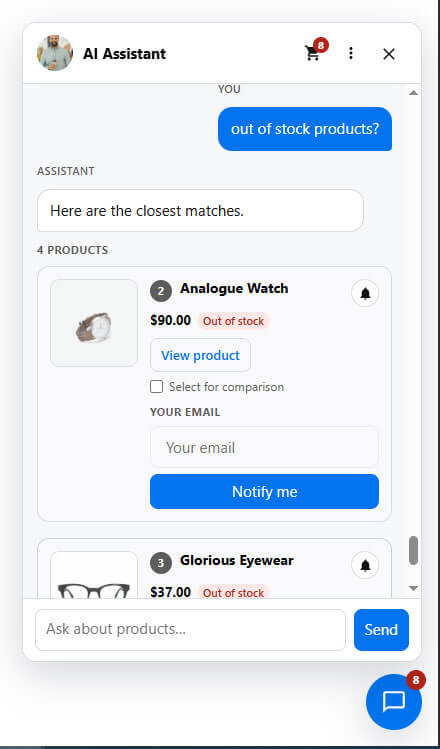
- Back-in-stock notifications
- AI and non-AI fallback search
These capabilities turn a simple chatbot into a broader AI-powered shopping experience.
AI Chatbot vs AI Shopping Assistant: What’s the Difference?
The terms are often used interchangeably, but there is an important distinction.
A traditional chatbot may focus on:
- FAQs
- Basic support
- Contact information
- Store policies
An AI shopping assistant goes further.
It can help customers:
Discover → Understand → Compare → Choose → Add to Cart → Checkout → Track Orders
That makes it much closer to a digital sales assistant.
The difference is not simply the AI model behind the system. It is how deeply the AI is connected to the ecommerce workflow.
AI Shopping Assistant vs Traditional WooCommerce Search
Traditional search still has an important role in ecommerce.
For example, a customer who knows the exact product name may prefer simply typing:
“Nike Air Max 270”
But customers with a broader requirement may prefer:
“I need comfortable black sneakers for daily walking under $120.”
AI shopping search is particularly useful for the second type of query.
The strongest WooCommerce stores do not necessarily need to replace traditional search. Instead, they can combine conventional search with AI-powered intent understanding.
This creates a hybrid shopping experience where customers can shop using either keywords or natural conversation.
How to Prevent AI Hallucinations in WooCommerce
One of the biggest concerns with AI ecommerce assistants is incorrect information.
An AI should not invent:
- Product prices
- Stock availability
- Product specifications
- Product names
- Discounts
- Shipping information
The safest approach is to ground product-related answers in your WooCommerce catalog.
For example:
Customer:
“Is this product available in blue?”
The assistant should check the actual product variations rather than guessing.
Similarly:
Customer:
“What is the price?”
The answer should come from the current WooCommerce product data.
This is why catalog grounding is one of the most important technical considerations when choosing an AI shopping assistant.
What Happens If the AI Is Unavailable?
A good ecommerce AI implementation should have a fallback.
If an AI API is temporarily unavailable, customers should not lose access to product discovery.
Depending on the implementation, the assistant can fall back to:
- Native WooCommerce search
- Product/category search
- Predefined Quick Actions
- Standard store navigation
WooAssistant is designed with AI-free fallback search so that AI is an enhancement to the shopping experience rather than the only way customers can find products.
Best Practices for Using AI in WooCommerce
Adding an AI assistant is relatively easy. Making it useful requires more planning.
1. Keep Your Product Data Clean
AI can only provide useful catalog-based answers when your product data is accurate.
Make sure your products have:
- Clear titles
- Detailed descriptions
- Correct prices
- Accurate attributes
- Proper variations
- Updated stock
- Relevant categories
- Useful product images
Better product data generally creates better product discovery.
2. Don’t Make Every Interaction AI-Only
Give customers alternative ways to navigate your store.
AI should complement:
- Search
- Categories
- Filters
- Product pages
- Navigation
- Checkout
Different shoppers prefer different shopping methods.
3. Use AI for High-Intent Conversations
The most valuable conversations are often related to purchase intent.
Examples include:
“Which product should I buy?”
“What’s the difference between these two?”
“Do you have something cheaper?”
“Can you recommend something for beginners?”
“Can I add that to my cart?”
These are strong opportunities for an AI sales assistant.
4. Monitor Customer Questions
Your AI conversations can reveal gaps in your product pages.
If customers repeatedly ask:
“Does this work with Model X?”
you may want to add that compatibility information directly to the product page.
In this way, AI analytics can help improve the entire ecommerce experience.
5. Control AI Usage and Costs
AI API usage can increase as traffic grows.
Use:
- Model selection
- Token limits
- Usage monitoring
- Daily budgets
- Fallback search
to keep AI costs predictable.
How WooAssistant Can Add AI Shopping to Your WooCommerce Store
WooAssistant is built specifically around the WooCommerce shopping journey.
Instead of adding a generic chatbot, it provides an AI-powered shopping layer that connects product discovery, recommendations, product questions, comparisons, cart assistance, order assistance, and abandoned-cart workflows.
Its feature set includes:
- Natural-language product search
- AI intent understanding
- Hybrid search
- Smart recommendations
- Product Q&A
- Product comparison
- AI sales agent
- Cart assistant
- AI upsell and cross-sell
- Order assistant
- Abandoned-cart recovery
- Multilingual AI
- Quick Actions
- Custom branding
- OpenAI and Google Gemini support
- Usage tracking
- Token budgets
- Analytics
- Privacy controls
- Back-in-stock notifications
The key idea is simple: WooCommerce remains the source of truth for your store, while AI makes the shopping experience conversational.
Frequently Asked Questions
Can I add an AI shopping assistant to any WooCommerce store?
In most cases, yes, provided the store meets the plugin’s technical requirements and uses standard WooCommerce product data.
However, compatibility should always be tested with your theme, plugins, custom product types, and checkout configuration.
Does an AI shopping assistant replace WooCommerce search?
Not necessarily.
A better approach is often to combine traditional WooCommerce search with AI-powered natural-language search.
Customers can then use whichever shopping method they prefer.
Can AI recommend products from my WooCommerce catalog?
Yes. When the AI assistant is connected to your WooCommerce catalog, it can use product information such as categories, attributes, variations, prices, stock, and product relationships to provide relevant recommendations.
Can customers add products to their cart through AI chat?
Yes, with a compatible AI shopping assistant.
For example, customers can ask the assistant to add a recommended product to their cart. Advanced implementations can also support quantity changes and product removal, with confirmation before cart modifications.
Can a WooCommerce AI assistant answer product questions?
Yes.
It can answer questions using available product information, including descriptions, attributes, variations, pricing, and stock data.
The quality of the answer depends heavily on the quality and completeness of your WooCommerce product data.
Does an AI shopping assistant increase sales?
It can help reduce friction in product discovery, recommendations, and checkout, but results vary by store.
The most useful way to evaluate it is to track metrics such as product engagement, add-to-cart activity, checkout interactions, assisted conversions, and revenue attribution rather than assuming AI automatically increases sales.
Is an AI shopping assistant the same as a WooCommerce chatbot?
Not exactly.
A chatbot can primarily focus on conversations and support.
An AI shopping assistant is designed around the ecommerce journey, including product discovery, recommendations, comparison, cart actions, and purchase assistance.