
The AI Shopping & Sales Layer for WooCommerce
Turn Every Conversation Into a Shopping Experience.
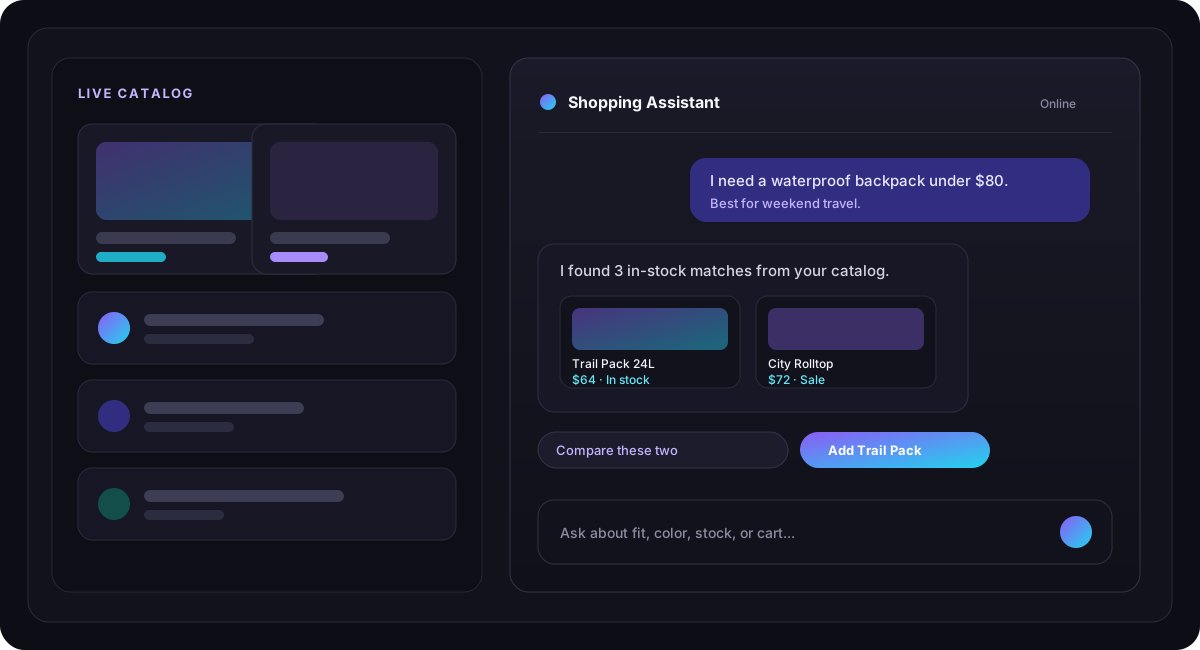
Help shoppers discover the right products, get instant answers, compare options, manage their cart, check orders, and come back to an abandoned purchase, through one assistant grounded in your live WooCommerce catalog.
AI Search
Natural product discovery
Sales Agent
Guided shopping conversations
Cart + Orders
Commerce actions in chat
Recovery
Abandoned-cart workflows
More than a chatbot
A complete AI shopping journey.
A chatbot answers questions. An AI shopping assistant helps customers shop, from the first product question to checkout and post-purchase help, using your real store data.
AI Product Search
Shoppers describe what they want. The assistant matches that intent to relevant WooCommerce products.
Smart Recommendations
Suggest related products, upsells, cross-sells, and cart-aware alternatives from your catalog.
Product Q&A
Answer questions from real product content, attributes, variations, pricing, and availability.
Product Comparison
Let shoppers compare options side by side before they decide.
Cart Assistant
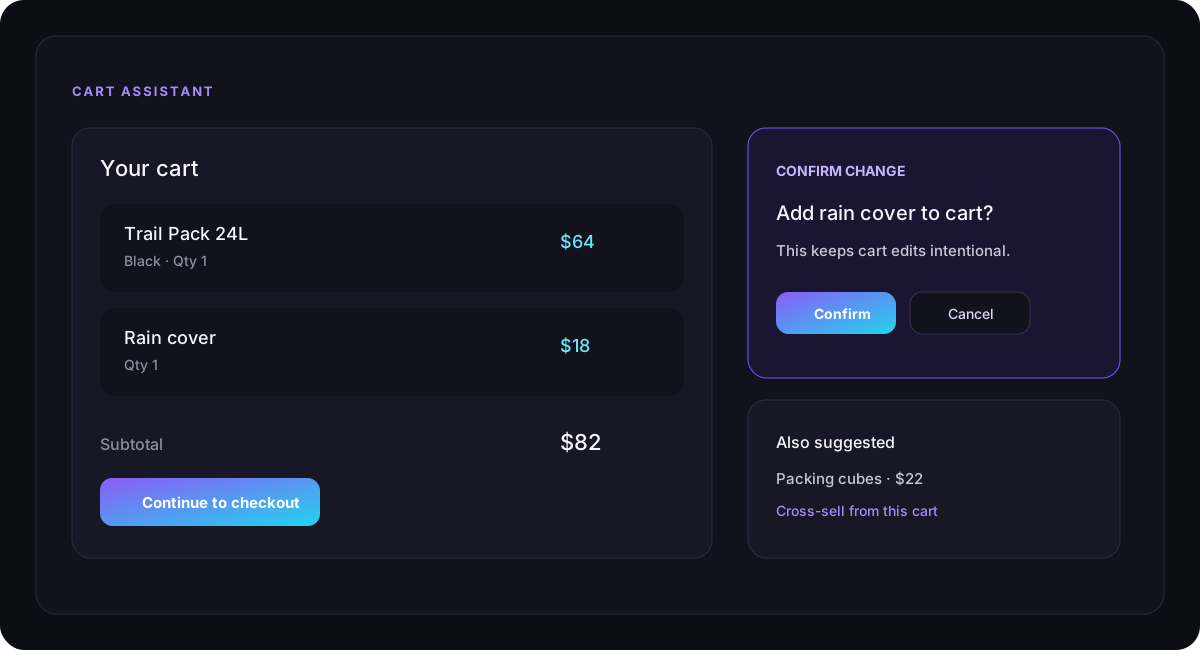
View, add, update, remove, and clear cart items in chat, with confirmation before changes.
Order Assistant
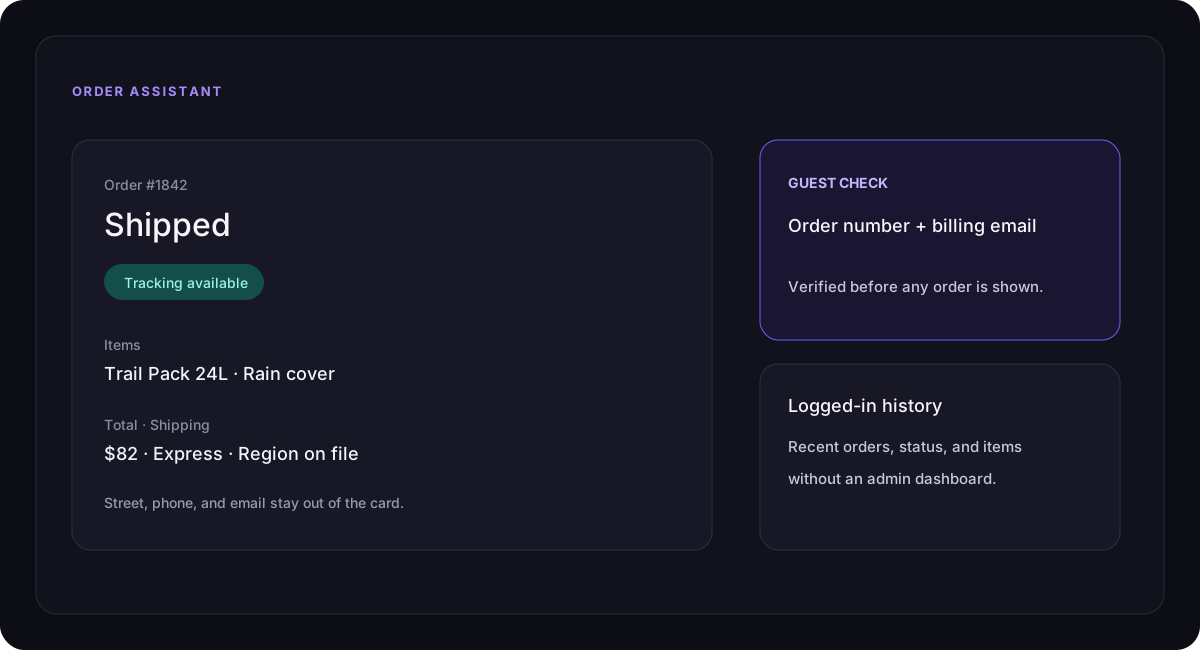
Give logged-in customers and verified guests useful order status without exposing sensitive billing fields.
How people actually shop
Customers do not always know the product name.
They ask questions. The assistant is built to turn those questions into catalog matches, not generic chat.
“I need a waterproof backpack under $80.”Budget, use, and product type in one sentence.
“Which one is best for travel?”A vague need that should become a clearer match.
“Can you add the recommended one to my cart?”Discovery that can continue into checkout.
01 AI Product Discovery
Search the way customers actually think.
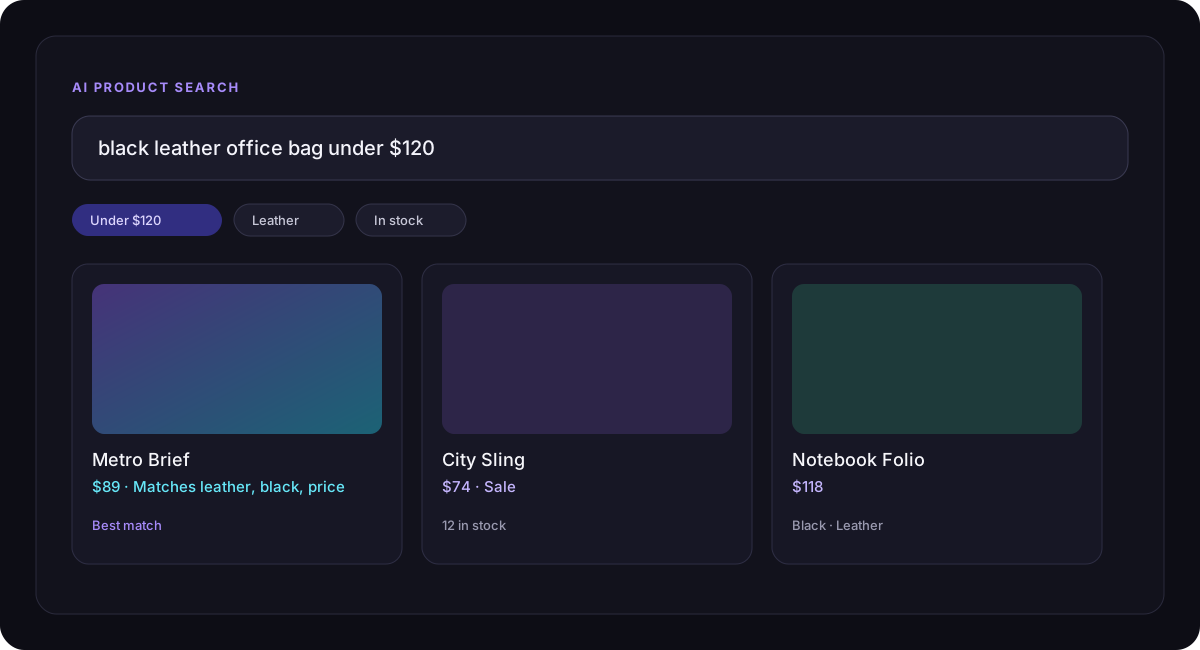
Instead of clicking through filters, shoppers can say what they need. Intent can use categories, attributes, price, sale status, and stock, then results are checked against live WooCommerce data.
- Natural-language product queries
- Category and attribute matching
- Price and sale awareness
- Stock-aware results
- Optional match explanations
- Automatic, native, AI-assisted, and hybrid search modes
02 Catalog Grounding
Keep answers connected to your WooCommerce catalog.
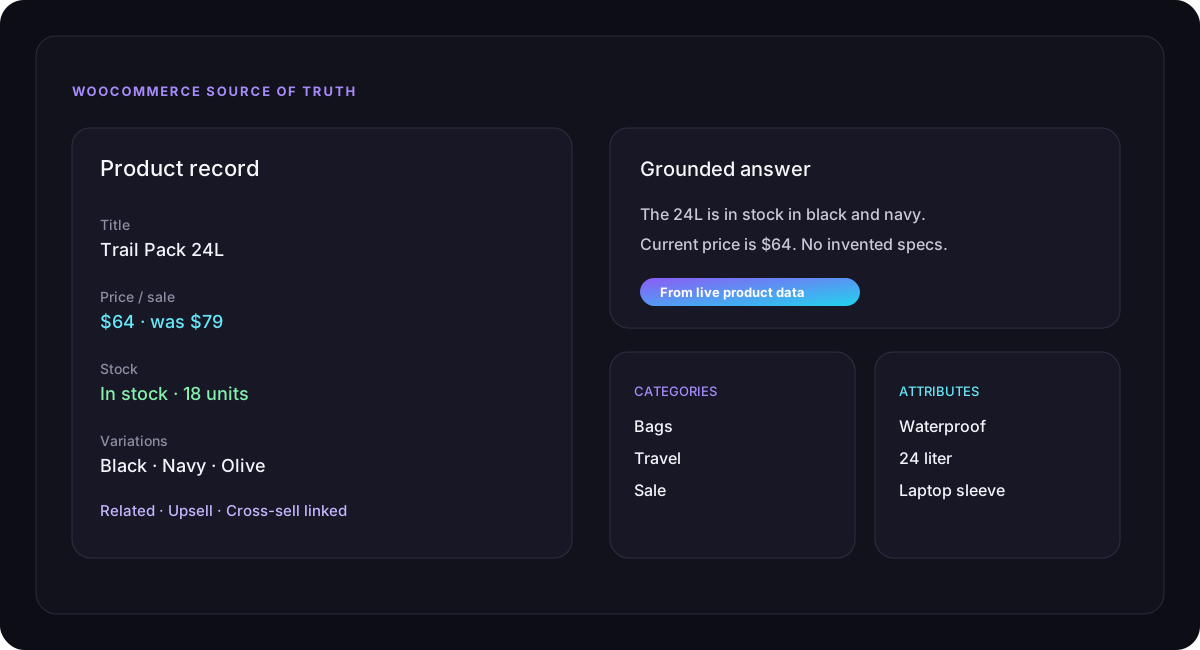
The assistant should not invent products, prices, availability, or specifications. WooCommerce stays the source of truth. AI supplies the conversation.
- Products, categories, attributes, and variations
- Prices, sale prices, and stock
- Related, upsell, and cross-sell links
- Catalog-based product Q&A
- AI-free fallback search when AI is unavailable
03 Guided Selling
Turn “what should I buy?” into a clearer choice.
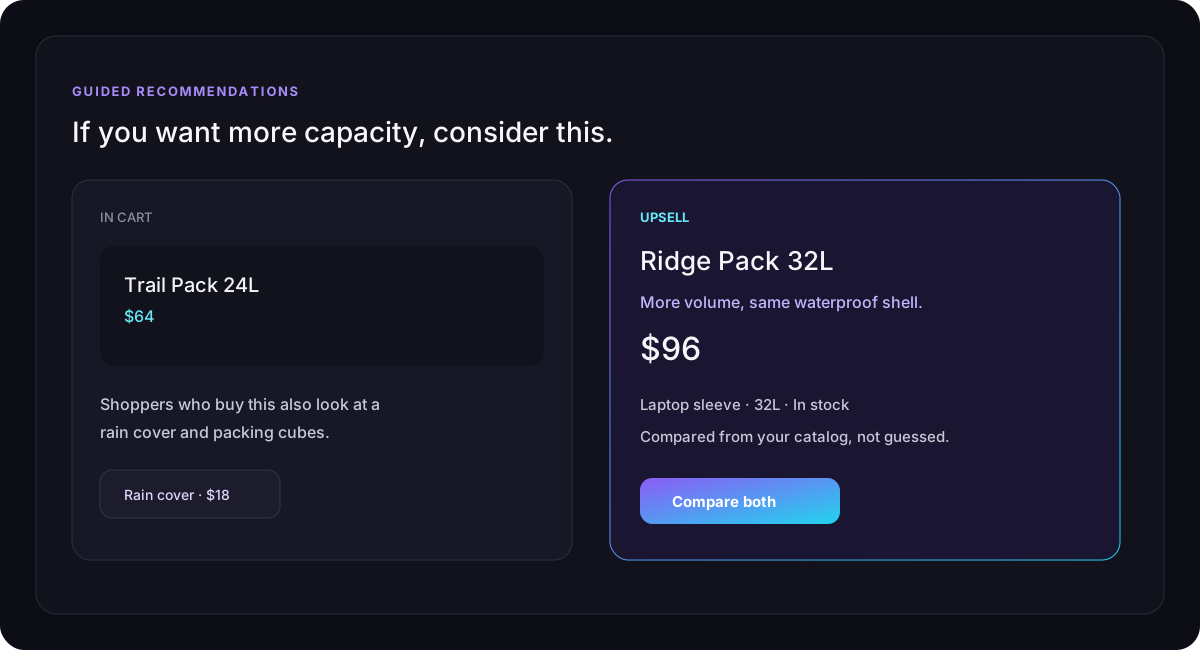
Not every shopper arrives with a SKU. The sales-style assistant can ask a budget or use-case question, then recommend better-fit and complementary products from the catalog.
- Clarifying questions for broad requests
- Related, upsell, and cross-sell suggestions
- Cart-aware recommendations
- Side-by-side product comparison
- Selling guardrails so weak matches are not dumped on the shopper
04 Cart & Checkout
Let shoppers act without leaving the conversation.
The path from “this looks right” to checkout can stay inside the assistant. Cart changes ask for confirmation so adds and removals stay intentional.
- In-chat cart view and totals
- Add products, including variation-aware flows
- Change quantity, remove items, or clear the cart
- Confirmation before cart changes
- Checkout shortcut from the conversation
05 Post-Purchase
Continue helping after the sale.
Routine order questions can become self-serve conversations. Logged-in shoppers can ask about recent orders. Guests verify with order number and billing email first.
- Order status and details cards
- Items, totals, and shipping method or region
- Tracking when it is available
- Guest verification before an order is shown
- Sensitive billing fields stay out of the chat card
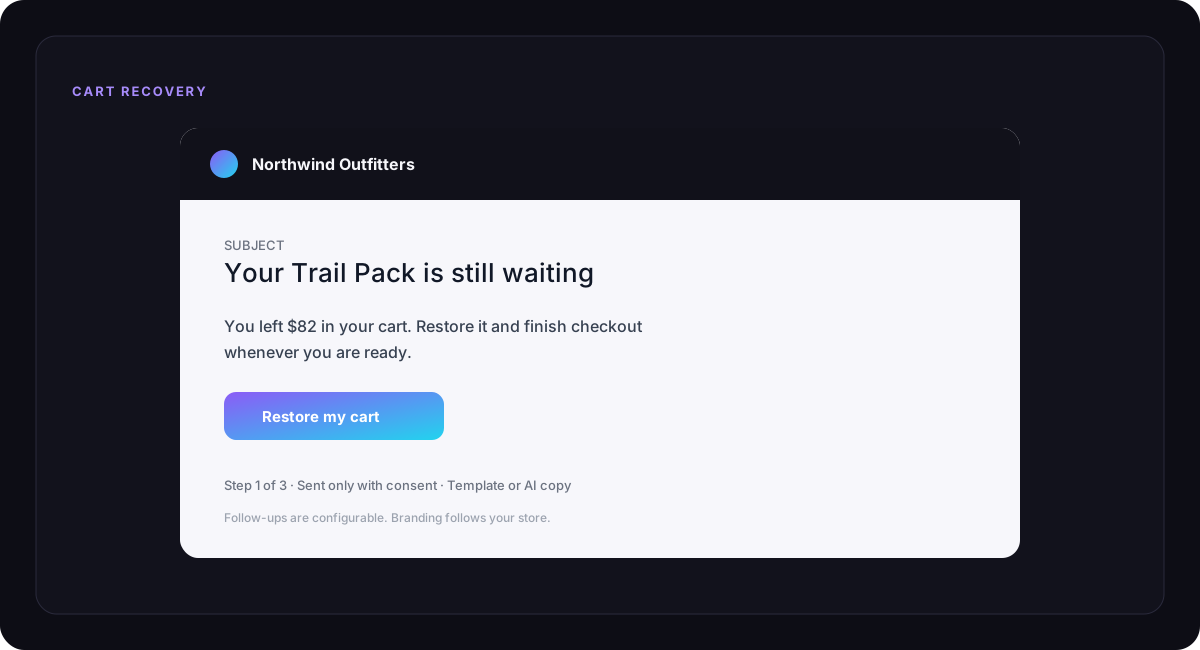
06 Abandoned Cart Recovery
Bring shoppers back with a branded reminder.
Not every cart becomes an order. Recovery campaigns can restore the cart with email follow-ups, your branding, and optional AI-written copy. Consent stays in your control.
- Abandoned cart detection
- Restore links and configurable redirect
- Multi-step follow-ups
- Templates or optional AI-generated copy
- Consent, logo, color, and CTA controls
Built for modern stores
AI that fits your store, brand, and workflow.
Keep the shopper experience on-brand, and keep provider, language, privacy, and usage settings in WordPress.
Multilingual AI
Auto-detect or lock replies to English, Spanish, French, German, Italian, Portuguese, Arabic, Bengali, Hindi, Chinese, or Japanese. RTL-aware for supported right-to-left languages.
Custom Branding
Title, greeting, avatar, launcher position, accent, bubbles, send button, and shortcode or floating placement.
Provider Choice
OpenAI or Google Gemini, with model settings, encrypted keys, a connection test, and a daily token budget that can fall back to catalog search.
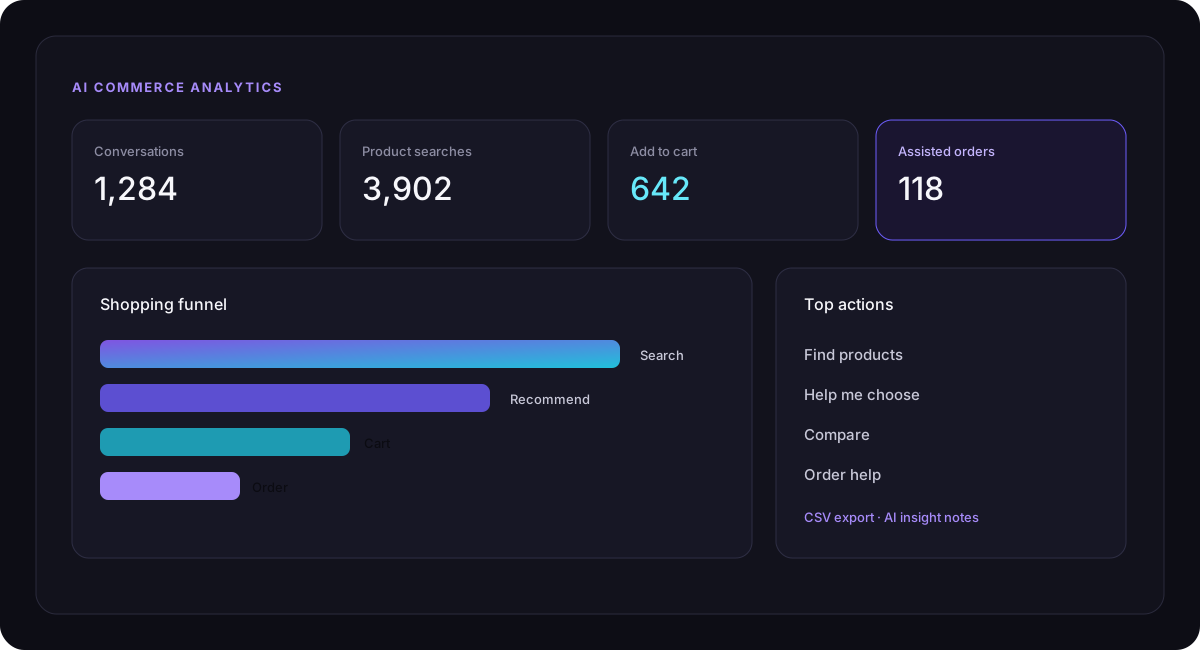
07 Analytics & Control
See how shoppers use the assistant.
Track conversations, searches, recommendations, comparisons, questions, add-to-cart, checkout, and order-related engagement. Where attribution is enabled, you can also see orders influenced by the assistant.
- Funnel and KPI views
- Top products and Quick Actions
- Language and question insights
- CSV export and optional AI insight notes
- Usage tracking and a daily token budget
Complete feature set
Everything in one shopping layer.
Natural Language Search
AI Intent Understanding
Hybrid Search
Smart Recommendations
Product Q&A
Product Comparison
AI Sales Agent
Cart Assistant
AI Upsell & Cross-sell
Order Assistant
Abandoned Cart Recovery
Multilingual AI
Quick Actions
Custom Branding
OpenAI
Google Gemini
Token Budgets
Usage Tracking
Privacy Controls
CSV Export
Back-in-Stock Notify
RTL-Friendly
How it works
Simple for shoppers. Flexible for store owners.
Connect your AI provider
Add OpenAI or Google Gemini, choose a model, and test the connection. Search can still help before a key is added.
Customize the experience
Set the title, greeting, colors, language, Quick Actions, usage limit, and privacy posture.
Let shoppers buy naturally
Customers search, ask, compare, add products, manage carts, and get order help in one conversation.
FAQ
Questions, answered.
Does it work with WooCommerce products?
Yes. Answers and product results are designed around your WooCommerce catalog: products, categories, attributes, variations, prices, sale prices, stock, and related product links.
Which AI providers are supported?
OpenAI and Google Gemini, with selectable models, a connection test, and encrypted API key storage. It does not claim to support every AI vendor as a built-in provider.
Can shoppers add products to the cart from chat?
Yes. The cart assistant can show the cart and support add, quantity, remove, and clear actions. Mutating actions use a confirmation step.
What happens if AI is unavailable?
Depending on your settings, the assistant can fall back to native WooCommerce search and suggested catalog searches. AI is an enhancement, not the only way shoppers can discover products.
Can I customize the chatbot?
Yes. You can set the title, greeting, avatar, colors, launcher position, fallback messages, Quick Actions, and whether it floats or is placed with a shortcode.
Does it invent product specifications?
It is built not to. Product Q&A uses available WooCommerce product content rather than fabricated specs. If a detail is not in the catalog, it should not be presented as a fact.
Ready for a smarter WooCommerce store?
Make shopping feel like a conversation.
Bring product discovery, guided selling, cart assistance, order help, and recovery into the store you already run.